Pick the format
A limited release is a supply decision before it is a marketing decision: a fixed number of units, and more people who want one than units to go around. The format decides who ends up with the product.
First come, first served works when stock covers demand. If most people who want one can get one, a normal product page does the job.
Once demand runs past stock, speed becomes the whole contest. An edition of 646 pairs is exactly the kind of release bots exist for, and a botted win becomes a resale listing in 90 seconds. A draw changes the rule from click speed to a fair chance: fans enter during a window, the filtration wall removes bots before anyone is picked, and winners are drawn at random from the clean pool. Read what a Shopify draw is, or go straight to how to run a product draw on Shopify.
| Question | First come, first served | Draw |
|---|---|---|
| Who gets the product | Whoever checks out first | Winners drawn at random from the clean pool |
| What a bot gains | Speed, the whole contest | Nothing, the filter runs before selection |
| Storefront on launch day | Everyone hits checkout at once | Entries arrive across the window. The Phantom 6 storefront stayed live at 9.2 times stock in demand |
| What you learn | Sales until a size sells out | A demand curve by size, because every entry carries one |
Choose how winners pay
Every SuperSwipe release starts with one choice between two release modes. In Standard, also called charge on win, fans enter through a $0 Shopify checkout that saves a card, and winners are charged automatically the moment the draw ends. In Pay After, fans enter with a form and no payment method, and winners get a private checkout link by email and SMS to pay while supplies last. Fans who are not selected are never charged in either mode.
Pick Standard when demand is certain and you want revenue locked the second the draw closes. Pick Pay After when reach matters most: the Phantom 6 Low Elite ran on Pay After and pulled 818% more entries than stock. The charge on win vs Pay After guide covers entry, payment and stock in both modes.
Set stock by size
SuperSwipe takes stock per variant when you create the release, and those are the numbers fans compete for. In Standard, the number of winners is capped by your stock, so it never picks more winners than you have units. In Pay After, live Shopify inventory is the referee.
The hard part is how many of each size. A draw answers that better than a shelf release, because every entry carries a size. The release dashboard breaks stock, entries, winners selected and paid orders out by variant, and requests for sizes with little or no stock are captured instead of lost at the shelf.
That makes the last draw the best input for the next one. When VIRGINIA ran the adidas Adistar Jellyfish Triple White, the entries built the true size curve for the silhouette, and the core of the size run was fully allocated and paid. Every SuperSwipe draw doubles as a forecast: the next buy is stocked where fans actually sit instead of where last season guessed.
If winners will pick up at one of your stores, you set stock per location per size when you create the release. Fans choose a store when they enter, and winners are matched to it with a strict radius check and real per location stock.
Choose the entry window
A draw has an open time and a close time, and both are yours to set. Schedule the release and the storefront button opens on its own. A public countdown on the product page shows fans when entries close, and when it hits zero, selection runs in the open on the same page.
Tell fans the times before the draw opens. VIRGINIA printed both on the product page for the Triple White: the draw closed July 28 at 10:00 AM EDT and winners were contacted by email on August 1. A stated close time gives fans a reason to enter now, and a stated result date keeps the same question out of your support inbox.
Make the window long enough for your audience to hear about it. Speed is no longer the contest, so there is no reason to close within minutes. Timing against the wider market matters too: the Crystal Sand draw ran five days before the wider adidas CONFIRMED release, and it sold out on the brand's own store.
In Pay After, selection is not the end of the draw. Private checkout links go out in timed payment waves sized to the stock you still have: SuperSwipe multiplies unsold stock by your oversend factor, set between 1.00 and 3.00 with a default of 1.30, waits 20 minutes from the last link sent, checks what is still unsold, and sends a fresh wave. Sending stops the moment stock hits zero.
Reward the fans who show up
Scarcity only works when it lands fairly. SuperSwipe gives you three ways to put loyal fans first without breaking the draw.
Decide who qualifies
With 646 pairs of the Air Force 1 '01 University Red, Victor Victor used SuperSwipe to define who qualified: past purchases and store spend on victorvictor.com helped determine access, and one pair per customer was enforced across the draw. Filters like a minimum order spend or a required location are yours to turn on per drop.
Give VIPs an edge with VIP Mode
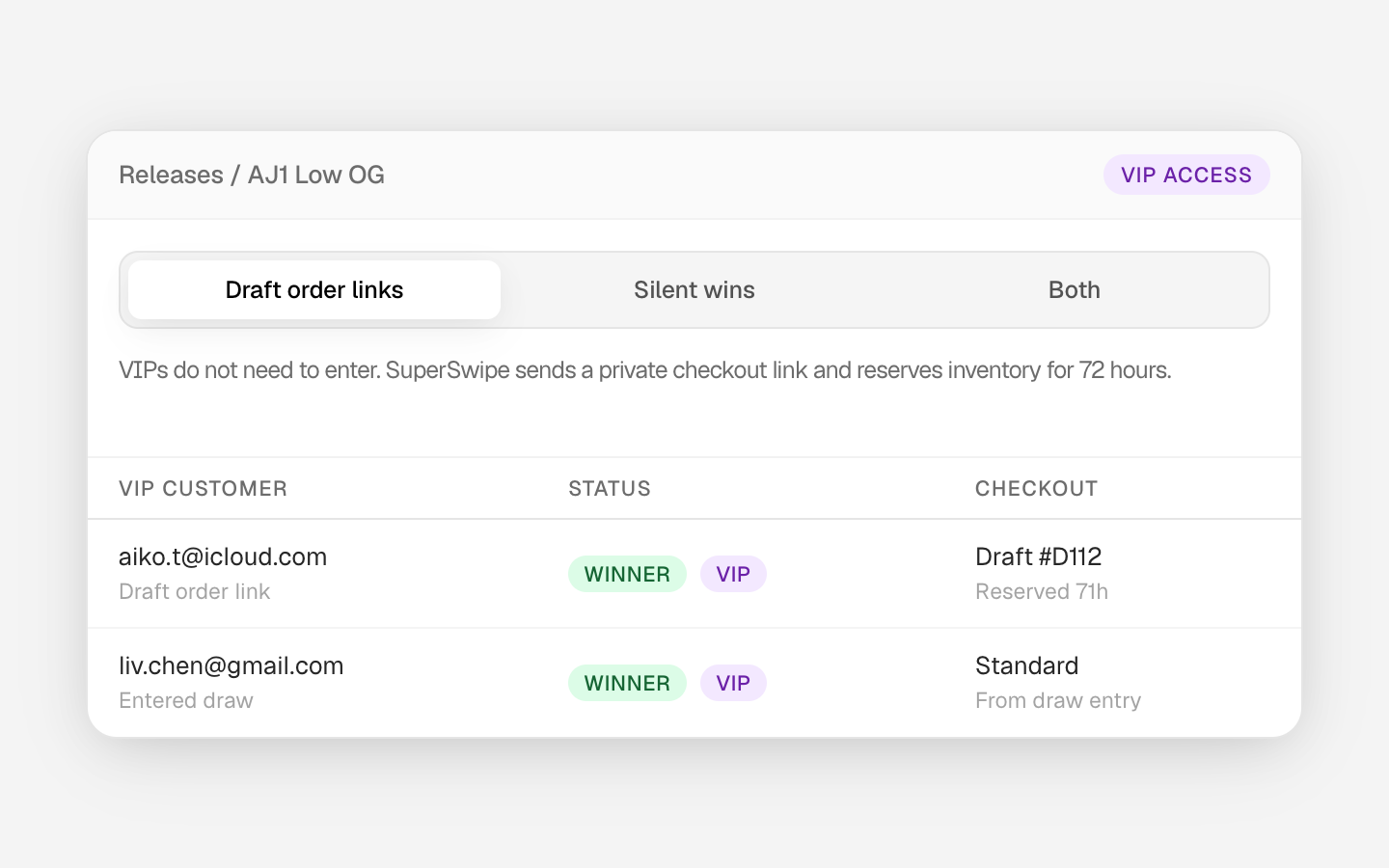
VIP Mode handles your best customers two ways, and both can run on one release. With silent wins you paste VIP emails. The VIPs enter like everyone else, clear the same bot wall, are prioritized during selection and are charged through the normal winner flow, and nothing public signals the edge. With draft order links you add an email and a variant per VIP, and SuperSwipe creates a private Shopify draft order, reserves that inventory for 72 hours and emails the VIP a private checkout link. No draw entry needed.
Offer Golden Tickets
SuperFan is the fan account across every SuperSwipe retailer, and it is where fans keep their Golden Tickets. A Golden Ticket guarantees selection: fans win one in a free giveaway on SuperFan, it arrives as a single use code by email, and they redeem it at entry on any eligible drop, where that entry is selected ahead of the random pool. Golden Tickets are opt in per store. Ask the SuperSwipe team to turn them on for your store.
Keep it on your own store
Where the draw runs decides who owns the fan afterwards. SuperSwipe is a Shopify native block on your own product page: entry, the countdown, the live draw and the result all happen on your domain, inside your theme, and shoppers are never sent to a third party site. Winners pay through your normal Shopify checkout, and no account is needed to enter.
The button and the entry modal should look like your store, not ours. Button Theme in Settings sets the colors, your own font and where the Protected by SuperSwipe line sits, and updates your storefront in about a minute. VIRGINIA pointed it at its cream page, black type and uploaded typeface, and the Jellyfish button read like part of blackyachtrock.com.
Keeping the draw on your storefront also keeps the data: the fans a draw brings stay your audience, your list, your remarketing, your relationship. Fans never pay a platform fee. The store pays a flat 5% per selected entry, and the app is free to install with no contract. The comparison with EQL covers fees, accounts and data.
Running more than one drop
A double drop is where launch infrastructure usually cracks. On September 4, Cactus Jack opened the Travis Scott x Nike AF1 '07 Low Ice Blue and the NikeCourt Zoom Vapor 12 HC for entries side by side on shop.travisscott.com, both as Pay After draws. Fans entered each with a form and no card, the storefront held both with no queue and no waiting room, and winners got a private checkout link by text and email.
Each product gets its own release with its own stock, mode, filters and entry window, and the dashboard lists every release as scheduled, running or completed. If two products share a launch, give them the same open time. The same holds across weeks: the Crystal Sand ran three weeks after the Triple White on the same store.
Measure and plan the next one
When the draw is done, the dashboard has the numbers that decide the next one. Look at entries against stock by size to see which variants were oversubscribed. Look at total not selected and the percentage blocked, then open the entry buckets: every entry lands as clean, filtered or flagged with the reason attached. Look at sell through: winners selected against how many actually paid, by variant.
Those numbers become the next plan: stock by size from the demand curve, a mode that matches how the audience behaved, filters tuned to what the wall caught, and a VIP list built from the fans who paid.
Checklist for the next release
- Format: a draw when demand runs past stock.
- Mode: Standard for revenue locked at close, Pay After for reach.
- Stock per size, from the last draw's entries against stock.
- Open and close times on the product page before the draw opens.
- Filters turned on for the drop.
- VIP emails or draft links added, and Golden Tickets on or off for your store.
- Button theme matched to the storefront.
- Stock per location, if winners will pick up at one of your stores.
- Afterwards: entries against stock by size, blocked entries and sell through.